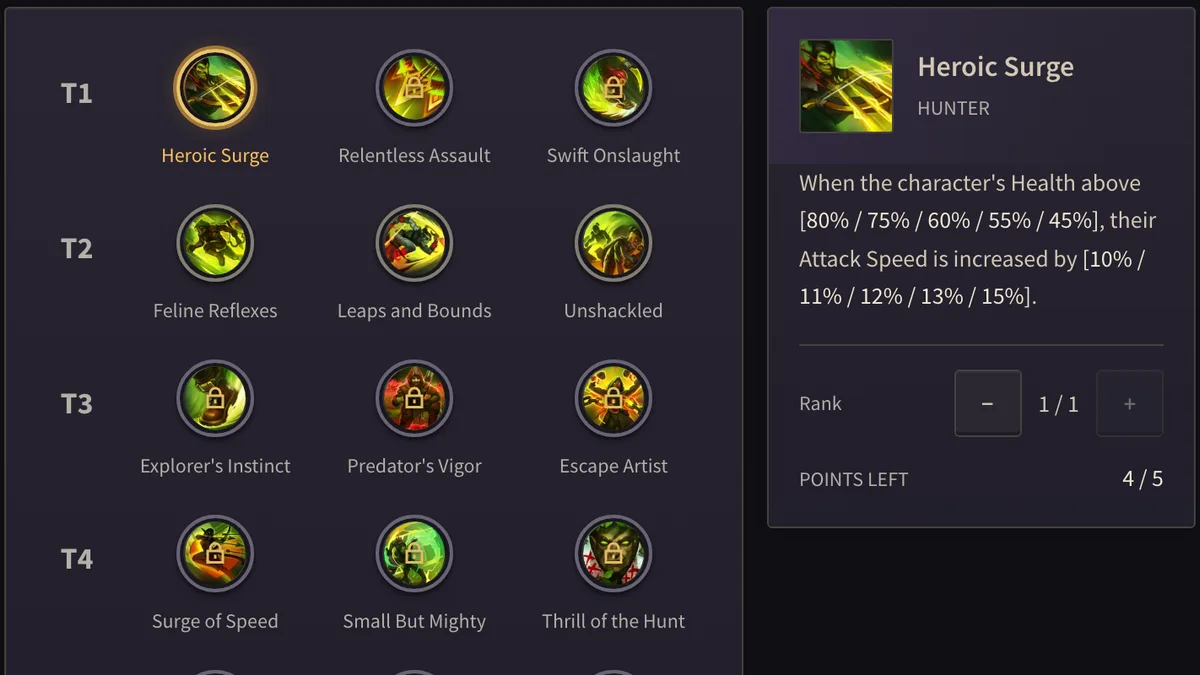
Select a talent to inspect it, then use + and − to change its rank. A class tree spends points by tier. A later tier that requires a point in the previous tier stays locked until that earlier tier has one. A weapon tree uses the same buttons. A connector between abilities spends from the same point pool.
You cannot add points beyond the talent’s maximum rank or the tree’s point cap. − is refused when removing that point would also remove a talent that depends on it. Refund the dependent talent first. The planner does not drop the later talent for you. If a description still has an unresolved value, it stays unresolved.
- Open the Hunter tree and select the first-tier talent.
- Spend one point with +. The next tier can then take a point.
- Try − on the first talent after the later talent has a point. The refund is refused until the later talent is refunded.
- On a weapon tree, stop when + no longer accepts a rank or the point cap is full.
- Copy the link on a single tree to share that tree. Continue in the character planner when the class and weapon trees should travel together.
- Open a public build to read someone else’s plan and copy it into your own planner. That list is separate from crafting quotes.
Hunter, then a weapon tree
Inspect a talent, then use + or − to assign points. HUNTER has 5 points. Heroic Surge is in the first tier. Feline Reflexes stays locked until that tier has a point. The tree says: Requires a point in tier 1.
With a point in both, − on Heroic Surge is refused. Refund dependent talents first.
DEFENDER has 26 points. Swift Legs does not take a rank above its maximum, and Champion Strike spends from the same pool. A point past the cap is refused. A link from this tree shares this tree. The character planner link carries the class tree with the point already placed.
Inspect Heroic SurgeInspect Feline ReflexesInspect Swift LegsOpen the HUNTER treeOpen the DEFENDER treeContinue in the character planner